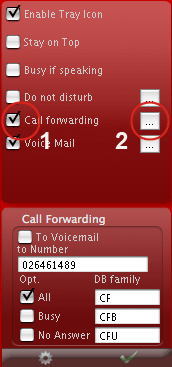


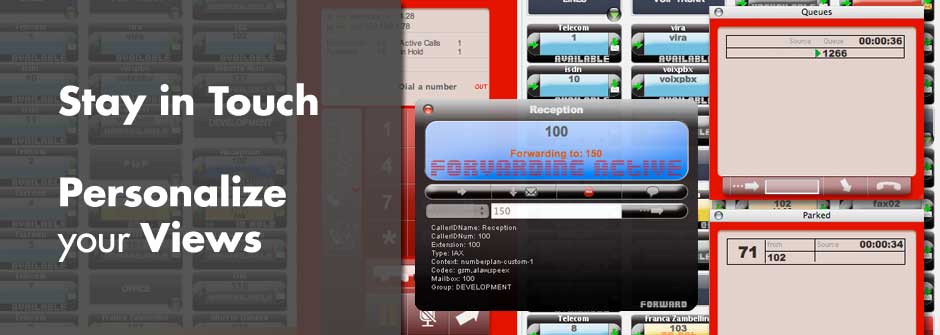
To Enable/Disable the Forwarding check/Uncheck the Call forwarding checkbox (1), to configure press the Right button (2), the forwarding dialog will be displayed.
VoxManager have two Forward features, can manage through the asterisk dialplan or independently, the usefulness of using Asterisk is to make it persistent.
If you use the Asterisk forward the possible options are:
forward ALL
forward on busy
forward no Answer
Voix manager create a record in astdb when Forwarding will be activaded, then delete it when Forwarding is deactivated. The Asterisk forward have priority on the local forward behavior.
The default astdb family are CF, CFB, CFU.
This is a simple example in how to setup a call forwad in Asterisk.
; set call forward on busy
exten => _*78*X.,1,Set(DB(CFB/${CALLERID(num)})=${EXTEN:4})

; IMPORTANT emit Forward userevent (asterisk 1.4)
 exten => *78*X.,n,UserEvent(|Act: CFB|User: ${CALLERID(num)})
 ; OR for asterisk 1.2
 exten => *78*X.,n,UserEvent(|Act: CFB)

exten => _*78*X.,n,PlayBack(cf_on)
exten => _*78*X.,n,Hangup

;
; delete call forward on busy
exten => **78,1,DBdel(CFB/${CALLERID(num)})

; IMPORTANT emit Forward userevent (asterisk 1.4)
 exten => *78*X.,n,UserEvent(|Act: CFB|User: ${CALLERID(num)})
 ; OR for asterisk 1.2
 exten => *78*X.,n,UserEvent(|Act: CFB)

exten => **78,n,PlayBack(cf_off)
exten => **78,n,Hangup


exten => _XXX,1,Set(CFB=${DB(CFB/${EXTEN})})
exten => _XXX,n,GotoIf($["${CFB}" = ""]?${CFB},1)
exten => _XXX,n,Dial(SIP/${EXTEN},30,tT)
see http://www.voip-info.org/wiki/view/Asterisk+call+forwarding
how setup call forwarding in asterisk.